• నమోదవ్వండి లేదా ప్రవేశించండి
  • ఇతర అనువర్తనాలు
    • Firefox
    • Thunderbird
    • Android కోసం Firefox

SeaMonkey పొడిగింతలు

  • పొడిగింతలు
    • విశేషత పొందినవి
    • అత్యంత ప్రసిద్ధమైనది
    • ఉత్తమ రేటింగు
    • Interface Customizations
    • RSS, వార్తలు, బ్లాగులు
    • అంతరంగికత, భద్రత
    • ఇతరత్రా
    • ఇష్టాంశములు
    • జాల, డెవలపర్ పనిముట్లు
    • దింపుకోళ్ళు అవుతున్నది మరియు ఫైల్ నిర్వహణ
    • ఫోటోలు మరియు మీడియా
    • భాషా మద్దతు మరియు అనువాదం
    • శోధన సాధనాలు
    • సైటు-ప్రత్యేకం
  • అలంకారాలు
    • అత్యంత ప్రసిద్ధమైనది
    • ఉత్తమ రేటింగు
    • సరికొత్తవి
    • ఇతర
    • కారణాలు
    • క్రీడలు
    • ప్రకృతి
    • ఫ్యాషన్
    • ముదురు
    • రుతువు
    • వెబ్‌సైట్లు
    • సంక్షిప్తము
    • సంగీతము
    • సినిమా మరియు టీవీ
    • సీనరీ
    • సెలవు
    Want more customization? Try Complete Themes
  • సేకరణలు
    • విశేషత పొందినవి

    • నేను చేసిన సేకరణలు
    • నా అభిమాన పొడిగింతలు
  • మరిన్ని…
    • నిఘంటువులు మరియు భాషా ప్యాక్లు
    • శోధన సాధనాలు
    • డెవలపర్ కేంద్రం

పొడిగింతలకు SeaMonkey స్వాగతం.

Add extra features and styles to make SeaMonkey your own.

మూసివేయి

On the go?

Check out our Mobile Add-ons site.

మూసివేయి
Rated 4 out of 5 stars
326 వాడుకరి సమీక్షలు
14 వాడుకరులు
సేకరణకు జోడించు
Compact Menu 2 యొక్క చిహ్నం

Compact Menu 2 4.3.1.1-signed.1-signed పునఃప్రారంభించడం అవసరం

ద్వారా Milly

Add a compact menu button to the navigation toolbar, and hide the menu bar.

దింపుకోళ్ళు లైనక్స్ కోసం ఏమైనా దింపుకోళ్ళు చేయండి దింపుకోళ్ళు విండోస్ కోసం ఏమైనా దింపుకోళ్ళు చేయండి

[హెచ్చరిక]అనుమతులు
« »
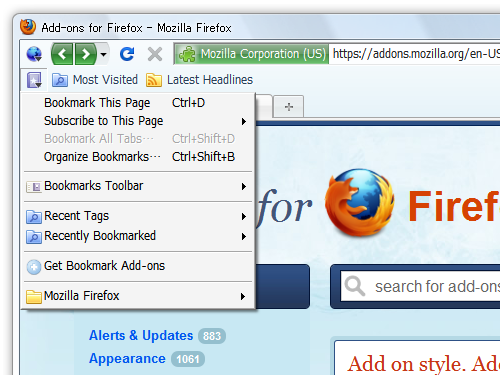
  • పొడిగింతల తెరపట్టు #1
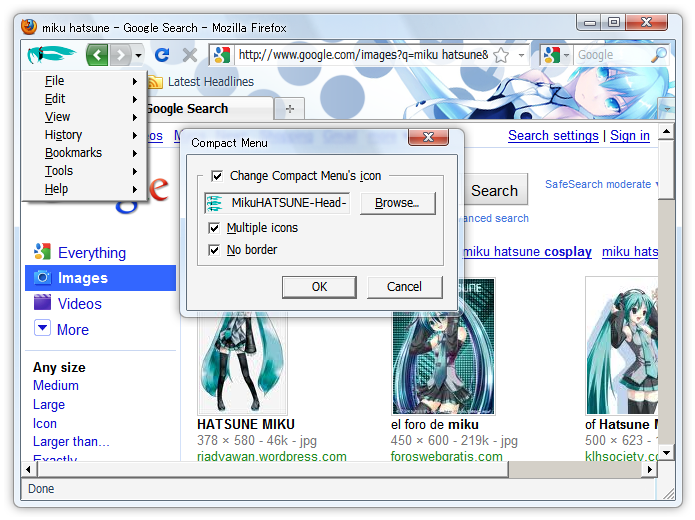
  • పొడిగింతల తెరపట్టు #2
  • పొడిగింతల తెరపట్టు #3
  • పొడిగింతల తెరపట్టు #4
  • పొడిగింతల తెరపట్టు #5
  • పొడిగింతల తెరపట్టు #6
  • పొడిగింతల తెరపట్టు #7
  • పొడిగింతల తెరపట్టు #8
Close
» «
  • పొడిగింతల ముంగిలి పేజీ
  • మదతు సైటు
  • వెర్షన్ 4.3.1.1-signed.1-signed సమాచారం
  • చివరిగా నవీకరించబడింది: అక్టో. 5, 2011
  • Mozilla Public License Version 1.1కింద విడుదల

ఈ పొడగింత గురించి

This extension add a "Compact Menu" button to the navigation toolbar, and hide the menu bar.
To press the button or Alt-key then "Menu" open.

After installation, a "Compact Menu" button is added to left side of the navigation toolbar.
If you want to customize it or, right-click on menubar and choose "Customize...", drag "Menu" button, "Compact Menu" button, "Bookmarks" button to the position where you like on toolbar, then click Done.

To avoid any possible conflicts, please uninstall any other Compact Menu versions first.

Similar add-ons:
  • Tiny Menu
  • Personal Menu
  • Hide Menubar

డెవలపర్ యొక్క వ్యాఖ్యలు

Updates 4.2.0 to 4.3.1:

  • Update target Firefox 10.0a1
  • Update target Thunderbird 10.0a1
  • Update target SeaMonkey 2.7a1
  • Add "Tabs in Titlebar" to toolbar's context menu.
  • Fix Bookmarks-menu. (Firefox 4.0 or later)
  • Fix icon not visible. (When profile folder path include space character.)
  • In Windows XP, modify the titlebar of the Personas.

వెర్షన్ సమాచారం

వెర్షన్ 4.3.1.1-signed.1-signed అక్టో. 5, 2011 విడుదల 43.4 KiB పనిచేస్తుంది Firefox 3.0 - 56.*, SeaMonkey 2.0 - 2.7a1, Thunderbird 3.0 - 10.0a1

  • Update target Firefox 10.0a1
  • Update target Thunderbird 10.0a1
  • Update target SeaMonkey 2.7a1
  • Add "Tabs in Titlebar" to toolbar's context menu.
  • Fix Bookmarks-menu. (Firefox 4.0 or later)
  • Fix icon not visible. (When profile folder path include space character.)
  • In Windows XP, modify the titlebar of the Personas.
  • Source code released under Mozilla Public License Version 1.1

దింపుకోళ్ళు లైనక్స్ కోసం ఏమైనా దింపుకోళ్ళు చేయండి దింపుకోళ్ళు విండోస్ కోసం ఏమైనా దింపుకోళ్ళు చేయండి

సంపూర్ణ వెర్షన్ చరిత్రను చూడండి

To create your own collections, you must have a Mozilla Add-ons account.

ఒక పొడిగింతల ఖాతా సృష్టించండి

లేదా మీ ప్రస్తుత ఖాతాకు లాగిన్ అవ్వండి

మూసివేయి

అనుమతులు

[హెచ్చరిక]

Some add-ons ask for permission to perform certain functions. Since you’re in control of your Thunderbird, the choice to grant or deny these requests is yours.

Please note this add-on uses legacy technology, which gives it access to all browser functions and data without requesting your permission.

మూసివేయి

దుర్భాషను నివేదించు

  1. If you suspect this add-on violates our policies or has security or privacy issues, please use the form below to describe your concerns. Please do not use this form for any other reason. The process for reporting copyright or trademark infringement is described at this page.

Footer logo
  • get to know add-ons
  • గురించి
  • బ్లాగు
  • డెవలపర్ కేంద్రం
  • ఫోరమ్

గోప్యతా విధానం  |  Report Trademark or Copyright Infringement  |  చట్టపరమైన గమనికలు  |  Report Misuse of Thunderbird Trademark  | Report a bug

Except where otherwise noted, content on this site is licensed under the
Creative Commons Attribution Share-Alike License v3.0 or any later version.