• నమోదవ్వండి లేదా ప్రవేశించండి
  • ఇతర అనువర్తనాలు
    • Firefox
    • Android కోసం Firefox
    • SeaMonkey

Thunderbird పొడిగింతలు

  • పొడిగింతలు
    • విశేషత పొందినవి
    • అత్యంత ప్రసిద్ధమైనది
    • ఉత్తమ రేటింగు
    • అంతరంగికత, భద్రత
    • ఇతరత్రా
    • క్యాలెండర్ మరియు తేదీ/Time
    • ట్యాగులు
    • దిగుమతి/Export
    • పరిచయాలు
    • భాషా మద్దతు
    • రూపురేఖలు, అభిమతీకరణ
    • సంచయాలు, వడపోతలు
    • సందేశ కూర్పు
    • సందేశాలు, వార్తా వీక్షణం
    • సంభాషణ మరియు IM
  • అలంకారాలు
    • అత్యంత ప్రసిద్ధమైనది
    • ఉత్తమ రేటింగు
    • సరికొత్తవి
    • ఇతర
    • కారణాలు
    • క్రీడలు
    • ప్రకృతి
    • ఫ్యాషన్
    • ముదురు
    • రుతువు
    • వెబ్‌సైట్లు
    • సంక్షిప్తము
    • సంగీతము
    • సినిమా మరియు టీవీ
    • సీనరీ
    • సెలవు
    Want more customization? Try Complete Themes
  • సేకరణలు
    • విశేషత పొందినవి

    • నేను చేసిన సేకరణలు
    • నా అభిమాన పొడిగింతలు
  • మరిన్ని…
    • నిఘంటువులు మరియు భాషా ప్యాక్లు
    • శోధన సాధనాలు
    • డెవలపర్ కేంద్రం

పొడిగింతలకు Thunderbird స్వాగతం.

Add extra features and styles to make Thunderbird your own.

మూసివేయి

On the go?

Check out our Mobile Add-ons site.

మూసివేయి
Rated 4 out of 5 stars
34 వాడుకరి సమీక్షలు
4,357 వాడుకరులు
సేకరణకు జోడించు
Attach from Clipboard యొక్క చిహ్నం

Attach from Clipboard 2.2

ద్వారా Michael Ganss

Create file attachments directly from the system clipboard.
ఇప్పుడే దింపుకోళ్ళు చేయండి ఏమైనా దింపుకోళ్ళు చేయండి

అనుమతులు
« »
  • పొడిగింతల తెరపట్టు #1
  • పొడిగింతల తెరపట్టు #2
  • పొడిగింతల తెరపట్టు #3
Close
» «
  • పొడిగింతల ముంగిలి పేజీ
  • వెర్షన్ 2.2 సమాచారం
  • చివరిగా నవీకరించబడింది: మార్చి 23, 2026
  • MIT/X11 Licenseకింద విడుదల

ఈ పొడగింత గురించి

Allows you to create file attachments directly from the system clipboard, making
it easy to attach screenshots without a detour into a graphics program. Works for HTML and plain text messages.

The following media types are supported:

  • Images (png, jpg, gif), format is auto-selected according to the clipboard.paste_image_type preference (defaults to png)
  • HTML (e.g. by copying from a browser)
  • Text
  • URLs

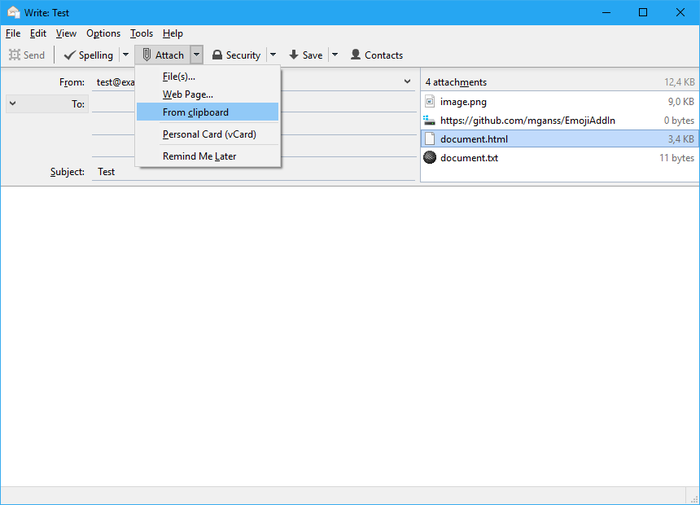
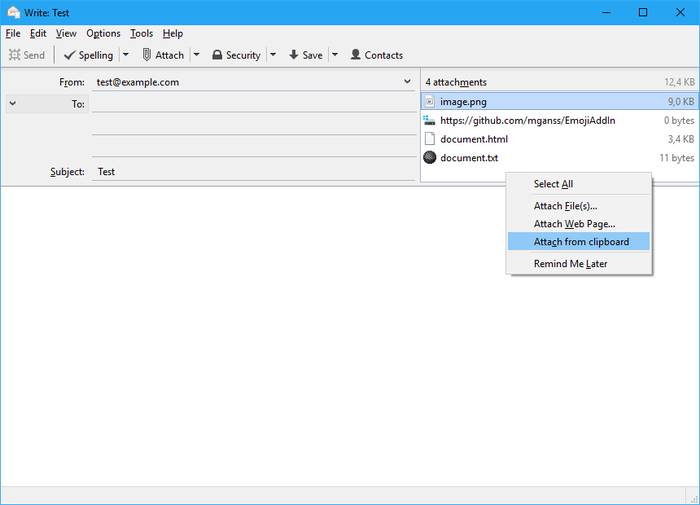
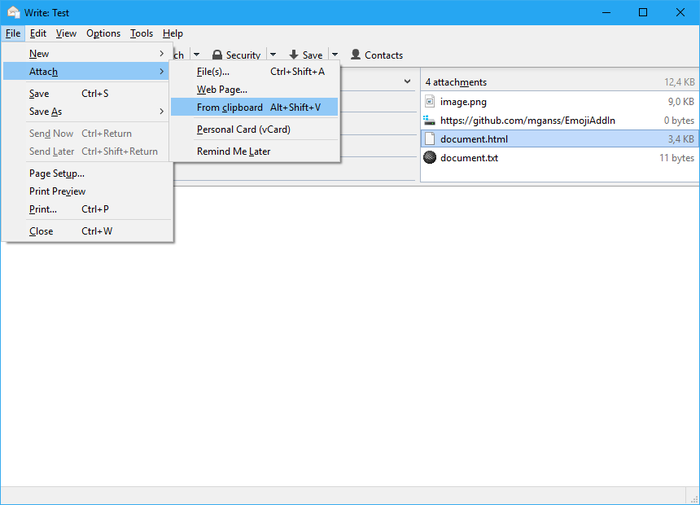
The extension can be accessed through the following paths:

  • File → Attach → From clipboard
  • Attach toolbar button menu → From clipboard
  • Context menu of attachments panel → Attach from clipboard

Example: Attach a screenshot (Windows)

  1. Press PrtSc (full desktop, Alt+PrtSc for active window only)
  2. Press Ctrl+Alt+V in compose message window in Thunderbird

వెర్షన్ సమాచారం

వెర్షన్ 2.2 మార్చి 23, 2026 విడుదల 9.1 KiB పనిచేస్తుంది Thunderbird 128.0 - 148.*

Bugfixes (see https://github.com/mganss/AttachFromClipboard/pull/27)
  • Source code released under MIT/X11 License

ఇప్పుడే దింపుకోళ్ళు చేయండి ఏమైనా దింపుకోళ్ళు చేయండి

సంపూర్ణ వెర్షన్ చరిత్రను చూడండి

To create your own collections, you must have a Mozilla Add-ons account.

ఒక పొడిగింతల ఖాతా సృష్టించండి

లేదా మీ ప్రస్తుత ఖాతాకు లాగిన్ అవ్వండి

మూసివేయి

అనుమతులు

Some add-ons ask for permission to perform certain functions (example: a tab management add-on will ask permission to access your browser’s tab system).

Since you’re in control of your Thunderbird, the choice to grant or deny these requests is yours. Accepting permissions does not inherently compromise your browser’s performance or security, but in some rare cases risk may be involved.

ఈ పొడగింత వీటిని చేయగలదు:

  • Have full, unrestricted access to Thunderbird, and your computer

మూసివేయి

దుర్భాషను నివేదించు

  1. If you suspect this add-on violates our policies or has security or privacy issues, please use the form below to describe your concerns. Please do not use this form for any other reason. The process for reporting copyright or trademark infringement is described at this page.

Footer logo
  • get to know add-ons
  • గురించి
  • బ్లాగు
  • డెవలపర్ కేంద్రం
  • ఫోరమ్

గోప్యతా విధానం  |  Report Trademark or Copyright Infringement  |  చట్టపరమైన గమనికలు  |  Report Misuse of Thunderbird Trademark  | Report a bug

Except where otherwise noted, content on this site is licensed under the
Creative Commons Attribution Share-Alike License v3.0 or any later version.