• నమోదవ్వండి లేదా ప్రవేశించండి
  • ఇతర అనువర్తనాలు
    • Firefox
    • Android కోసం Firefox
    • SeaMonkey

Thunderbird పొడిగింతలు

  • పొడిగింతలు
    • విశేషత పొందినవి
    • అత్యంత ప్రసిద్ధమైనది
    • ఉత్తమ రేటింగు
    • అంతరంగికత, భద్రత
    • ఇతరత్రా
    • క్యాలెండర్ మరియు తేదీ/Time
    • ట్యాగులు
    • దిగుమతి/Export
    • పరిచయాలు
    • భాషా మద్దతు
    • రూపురేఖలు, అభిమతీకరణ
    • సంచయాలు, వడపోతలు
    • సందేశ కూర్పు
    • సందేశాలు, వార్తా వీక్షణం
    • సంభాషణ మరియు IM
  • అలంకారాలు
    • అత్యంత ప్రసిద్ధమైనది
    • ఉత్తమ రేటింగు
    • సరికొత్తవి
    • ఇతర
    • కారణాలు
    • క్రీడలు
    • ప్రకృతి
    • ఫ్యాషన్
    • ముదురు
    • రుతువు
    • వెబ్‌సైట్లు
    • సంక్షిప్తము
    • సంగీతము
    • సినిమా మరియు టీవీ
    • సీనరీ
    • సెలవు
    Want more customization? Try Complete Themes
  • సేకరణలు
    • విశేషత పొందినవి

    • నేను చేసిన సేకరణలు
    • నా అభిమాన పొడిగింతలు
  • మరిన్ని…
    • నిఘంటువులు మరియు భాషా ప్యాక్లు
    • శోధన సాధనాలు
    • డెవలపర్ కేంద్రం

పొడిగింతలకు Thunderbird స్వాగతం.

Add extra features and styles to make Thunderbird your own.

మూసివేయి
On the go?

Check out our Mobile Add-ons site.

మూసివేయి
Rated 4 out of 5 stars
68 వాడుకరి సమీక్షలు
25,008 వాడుకరులు
సేకరణకు జోడించు
Emoji యొక్క చిహ్నం

Emoji 1.102.10

ద్వారా Michael Ganss

Add emojis to your e-mails.

ఇప్పుడే దింపుకోళ్ళు చేయండి ఏమైనా దింపుకోళ్ళు చేయండి

గోప్యతా విధానం
« »
  • పొడిగింతల తెరపట్టు #1
Close
» «
  • పొడిగింతల ముంగిలి పేజీ
  • వెర్షన్ 1.102.10 సమాచారం
  • చివరిగా నవీకరించబడింది: అక్టో. 21, 2022
  • MIT/X11 Licenseకింద విడుదల

ఈ పొడగింత గురించి

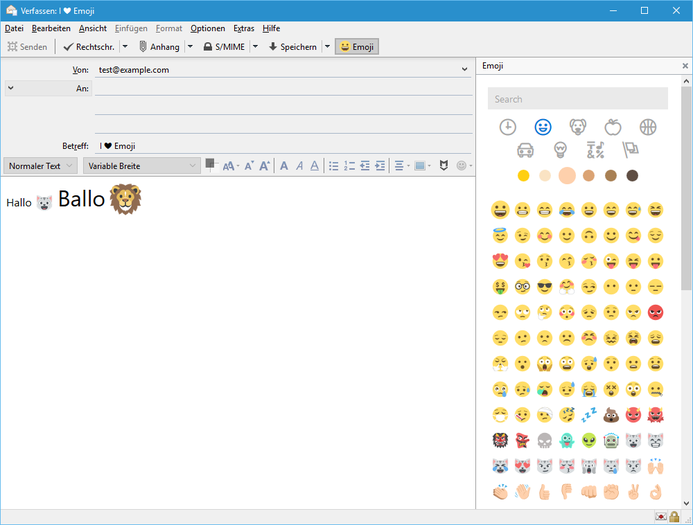
This extension adds a toolbar button to the compose window that opens a popup from which you can select emojis to insert into your e-mail. Features:
  • History
  • Categories
  • Select preferred skin tone
  • Search based on names and keywords
  • Works for HTML and text only emails

This add-on inserts Unicode characters in plaintext mode (obviously :) and images by default in HTML mode. In HTML mode, if you shift-click, Unicode characters are inserted. Also, there is an option to reverse this behavior, i.e. insert Unicode characters by default and images on shift-click. Unicode characters are always inserted in the chat window.

If the cursor was in the subject field prior to clicking on the popup toolbar button, emoji will be inserted there.

Please report bugs on the GitHub issues page.

Emoji art supplied by EmojiOne.

వెర్షన్ సమాచారం

వెర్షన్ 1.102.10 అక్టో. 21, 2022 విడుదల 16.4 MiB పనిచేస్తుంది Thunderbird 102.0 మరియు తరువాత

Update for JoyPixels 7.0 (Unicode 14.0)
  • Source code released under MIT/X11 License

ఇప్పుడే దింపుకోళ్ళు చేయండి ఏమైనా దింపుకోళ్ళు చేయండి

సంపూర్ణ వెర్షన్ చరిత్రను చూడండి

To create your own collections, you must have a Mozilla Add-ons account.

ఒక పొడిగింతల ఖాతా సృష్టించండి

లేదా మీ ప్రస్తుత ఖాతాకు లాగిన్ అవ్వండి

మూసివేయి

గోప్యతా విధానం

Adding an emoji to an HTML message adds an img element that will be loaded from the EmojiOne CDN at cdnjs.cloudflare.com. This does not apply to plaintext messages or plaintext emoji added to HTML messages (shift-click).
మూసివేయి

దుర్భాషను నివేదించు

  1. If you suspect this add-on violates our policies or has security or privacy issues, please use the form below to describe your concerns. Please do not use this form for any other reason. The process for reporting copyright or trademark infringement is described at this page.

Footer logo
  • get to know add-ons
  • గురించి
  • బ్లాగు
  • డెవలపర్ కేంద్రం
  • ఫోరమ్

గోప్యతా విధానం  |  Report Trademark or Copyright Infringement  |  చట్టపరమైన గమనికలు  |  Report Misuse of Thunderbird Trademark  | Report a bug

Except where otherwise noted, content on this site is licensed under the
Creative Commons Attribution Share-Alike License v3.0 or any later version.