• నమోదవ్వండి లేదా ప్రవేశించండి
  • ఇతర అనువర్తనాలు
    • Firefox
    • Android కోసం Firefox
    • SeaMonkey

Thunderbird పొడిగింతలు

  • పొడిగింతలు
    • విశేషత పొందినవి
    • అత్యంత ప్రసిద్ధమైనది
    • ఉత్తమ రేటింగు
    • అంతరంగికత, భద్రత
    • ఇతరత్రా
    • క్యాలెండర్ మరియు తేదీ/Time
    • ట్యాగులు
    • దిగుమతి/Export
    • పరిచయాలు
    • భాషా మద్దతు
    • రూపురేఖలు, అభిమతీకరణ
    • సంచయాలు, వడపోతలు
    • సందేశ కూర్పు
    • సందేశాలు, వార్తా వీక్షణం
    • సంభాషణ మరియు IM
  • అలంకారాలు
    • అత్యంత ప్రసిద్ధమైనది
    • ఉత్తమ రేటింగు
    • సరికొత్తవి
    • ఇతర
    • కారణాలు
    • క్రీడలు
    • ప్రకృతి
    • ఫ్యాషన్
    • ముదురు
    • రుతువు
    • వెబ్‌సైట్లు
    • సంక్షిప్తము
    • సంగీతము
    • సినిమా మరియు టీవీ
    • సీనరీ
    • సెలవు
    Want more customization? Try Complete Themes
  • సేకరణలు
    • విశేషత పొందినవి

    • నేను చేసిన సేకరణలు
    • నా అభిమాన పొడిగింతలు
  • మరిన్ని…
    • నిఘంటువులు మరియు భాషా ప్యాక్లు
    • శోధన సాధనాలు
    • డెవలపర్ కేంద్రం

పొడిగింతలకు Thunderbird స్వాగతం.

Add extra features and styles to make Thunderbird your own.

మూసివేయి

On the go?

Check out our Mobile Add-ons site.

మూసివేయి
Rated 4 out of 5 stars
24 వాడుకరి సమీక్షలు
3,213 వాడుకరులు
సేకరణకు జోడించు
G-Hub Lite యొక్క చిహ్నం

G-Hub Lite 7.1.0

ద్వారా Chris Schiffner

Google Tabs for Thunderbird! G-Hub Lite supports Calendar, Contacts, Drive, Docs, Sheets, Slides, Maps, Search, & Voice. Need Google Workspace support (formerly G Suite)? Check out G-Hub Pro: https://www.schiffner.com/index.php/software/g-hub-pro
ఇప్పుడే దింపుకోళ్ళు చేయండి ఏమైనా దింపుకోళ్ళు చేయండి

గోప్యతా విధానం అంతిమ-వాడుకరి లైసెన్సు ఒప్పందపత్రం అనుమతులు
« »
  • పొడిగింతల తెరపట్టు #1
  • పొడిగింతల తెరపట్టు #2
Close
» «
  • పొడిగింతల ముంగిలి పేజీ
  • మదతు సైటు
  • వెర్షన్ 7.1.0 సమాచారం
  • చివరిగా నవీకరించబడింది: అక్టో. 3, 2019
  • అన్ని హక్కులు ప్రత్యేకించబడ్డాయికింద విడుదల

ఈ పొడగింత గురించి

G-Hub Lite integrates commonly used of Google services into Thunderbird tabs!

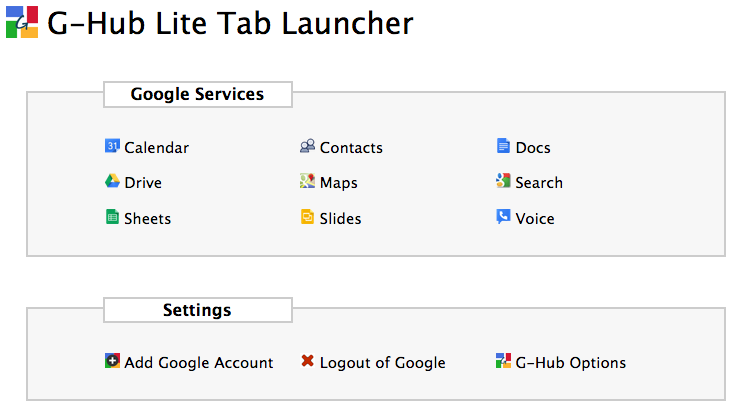
Supported services include: Google Calendar, Google Contacts, Google Drive, Google Docs, Google Sheets, Google Slides, Google Maps, Google Search, and Google Voice.

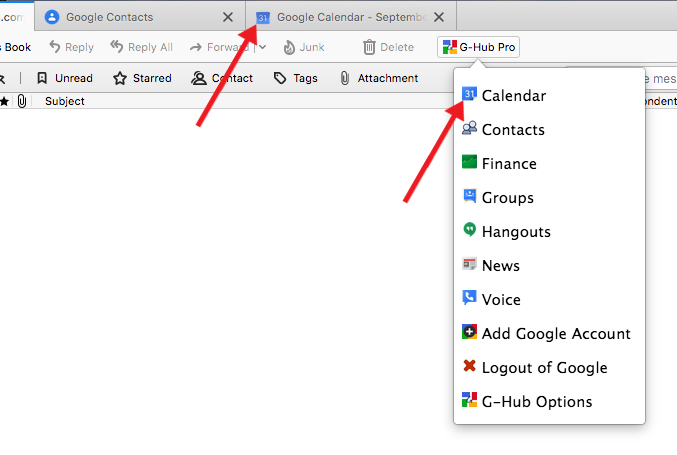
To use G-Hub Lite and open Google tabs
1) Add the G-Hub Lite toolbar button to your Thunderbird toolbar
2) Click on the G-Hub Lite toolbar button
3) Click on the Google service you would like to open in a new tab

Need more Google services or more customization? Go Pro! G-Hub Pro supports Google Workspace (formerly G Suite & Google Apps) and supports way more services. Plus, with G-Hub Pro you can customize the link for each Google service.

G-Hub Pro adds the ability to customize which Google services appear in the drop-down menu. Less clutter and more productivity!

For a full list of services supported by G-Hub Pro, please visit: https://www.schiffner.com/index.php/software/g-hub-pro/

G-Hub Lite is for personal use only. Want to use G-Hub for business? Go Pro! Your purchase supports continued development of this add-on!

Purchase G-Hub Pro at:
https://www.schiffner.com/index.php/software/g-hub-pro/

డెవలపర్ యొక్క వ్యాఖ్యలు

For the most recent information on known issues any work-arounds that may exist please visit: https://www.schiffner.com/software/g-hub-pro/known-issues/

వెర్షన్ సమాచారం

వెర్షన్ 7.1.0 అక్టో. 3, 2019 విడుదల 61.3 KiB పనిచేస్తుంది Thunderbird 68.0a1 మరియు తరువాత

G-Hub Pro users love the new drop-down menu so much I've brought it to the lite version. If you prefer using the Launcher tab, you can still use it by choosing it in the drop-down menu. I've also optimized the add-on to reduce file size.
  • Source code released under None

ఇప్పుడే దింపుకోళ్ళు చేయండి ఏమైనా దింపుకోళ్ళు చేయండి

సంపూర్ణ వెర్షన్ చరిత్రను చూడండి

To create your own collections, you must have a Mozilla Add-ons account.

ఒక పొడిగింతల ఖాతా సృష్టించండి

లేదా మీ ప్రస్తుత ఖాతాకు లాగిన్ అవ్వండి

మూసివేయి

గోప్యతా విధానం

G-Hub Lite does not collect personal data.
Searches made within the Google Search tab are not monitored or tracked in any way.
మూసివేయి

అనుమతులు

Some add-ons ask for permission to perform certain functions (example: a tab management add-on will ask permission to access your browser’s tab system).

Since you’re in control of your Thunderbird, the choice to grant or deny these requests is yours. Accepting permissions does not inherently compromise your browser’s performance or security, but in some rare cases risk may be involved.

ఈ పొడగింత వీటిని చేయగలదు:

  • విహారిణి ట్యాబులను చూడటం
  • నావిగేషన్ సమయంలో విహారిణి కార్యకలాపాన్ని చూడటం

మూసివేయి

అంతిమ-వాడుకరి లైసెన్సు ఒప్పందపత్రం

G-Hub Lite is for personal use only!

By downloading and installing this add-on you are agreeing that it will not be used in a business or commercial environment. For business or commercial use please purchase G-Hub Pro: http://www.schiffner.com/index.php/software/g-hub-pro/
మూసివేయి

దుర్భాషను నివేదించు

  1. If you suspect this add-on violates our policies or has security or privacy issues, please use the form below to describe your concerns. Please do not use this form for any other reason. The process for reporting copyright or trademark infringement is described at this page.

Footer logo
  • get to know add-ons
  • గురించి
  • బ్లాగు
  • డెవలపర్ కేంద్రం
  • ఫోరమ్

గోప్యతా విధానం  |  Report Trademark or Copyright Infringement  |  చట్టపరమైన గమనికలు  |  Report Misuse of Thunderbird Trademark  | Report a bug

Except where otherwise noted, content on this site is licensed under the
Creative Commons Attribution Share-Alike License v3.0 or any later version.