 పొడిగింతలు
పొడిగింతలకు Thunderbird స్వాగతం.
Add extra features and styles to make Thunderbird your own.
మూసివేయి

ఈ పొడగింత గురించి
Telegram Web in Thunderbird
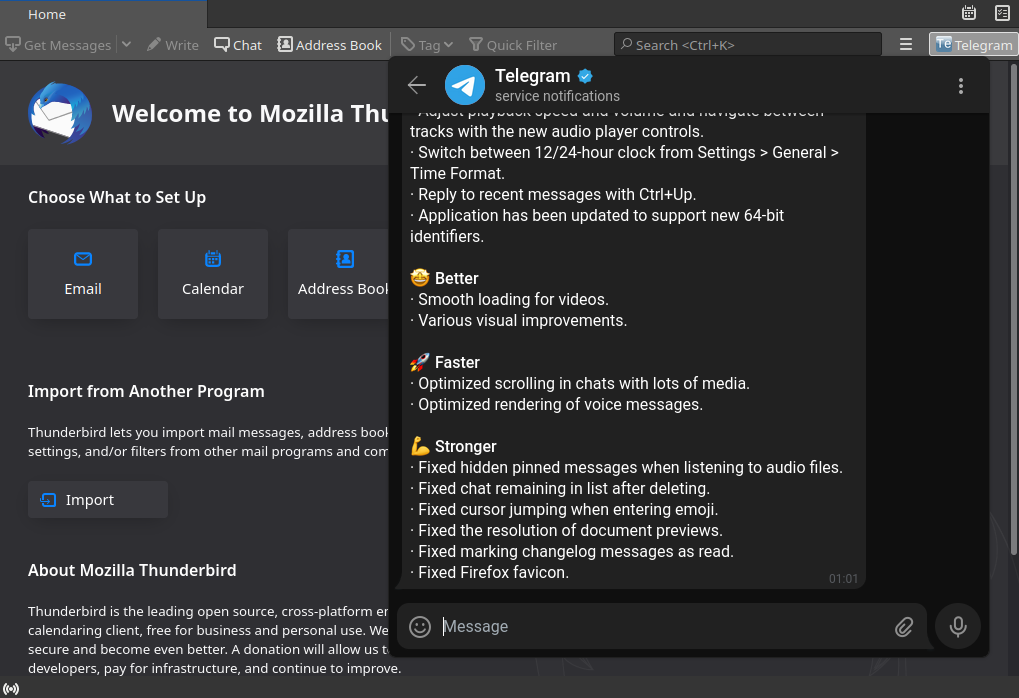
Telegram Web in Thunderbird is a Thunderbird add-on that opens Telegram Web in a Thunderbird tab.
How does it work ?
Once the add-on is installed, a new icon appears in Thunderbird Mail toolbar.
Click on it to open the Telegram Web tab.
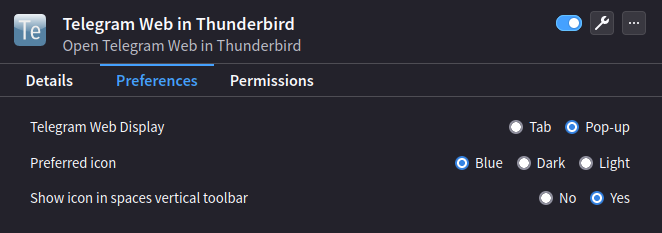
You can change add-on preferences to open Telegram Web in a pop-up rather than in a tab.
What permissions are needed ?
Telegram Web in Thunderbird will need to access Thunderbird tabs to maintain a unique tab.
Does Telegram Web in Thunderbird collects my data ?
No, Telegram Web in Thunderbird simply opens tabs in Thunderbird, exactly as it would be done in a web browser.
It does not collect any data.
Of course, Telegram Web works as it would do in your web browser, including regarding their own data collection.
So Telegram Web in Thunderbird will never collect my data ?
Never.
How do I stay connected when I re-open Thunderbird ?
If you wish to stay connected to Telegram Web, you will have to allow cookies.
The cookies menu can be access as follows in Thunderbird:
GNU/Linux : "Edit" > "Preferences" > "Privacy" or "Privacy and Security" > "Web Content" section.
macOS : "Thunderbird" > "Preferences" > "Privacy" or "Privacy and Security" > "Web Content" section.
Windows : "Tools" > "Options" > "Privacy" or "Privacy and Security" > "Web Content" section.
You will have to allow and keep cookies for this domain:
* https://web.telegram.org
Telegram Web in Thunderbird is a Thunderbird add-on that opens Telegram Web in a Thunderbird tab.
How does it work ?
Once the add-on is installed, a new icon appears in Thunderbird Mail toolbar.
Click on it to open the Telegram Web tab.
You can change add-on preferences to open Telegram Web in a pop-up rather than in a tab.
What permissions are needed ?
Telegram Web in Thunderbird will need to access Thunderbird tabs to maintain a unique tab.
Does Telegram Web in Thunderbird collects my data ?
No, Telegram Web in Thunderbird simply opens tabs in Thunderbird, exactly as it would be done in a web browser.
It does not collect any data.
Of course, Telegram Web works as it would do in your web browser, including regarding their own data collection.
So Telegram Web in Thunderbird will never collect my data ?
Never.
How do I stay connected when I re-open Thunderbird ?
If you wish to stay connected to Telegram Web, you will have to allow cookies.
The cookies menu can be access as follows in Thunderbird:
GNU/Linux : "Edit" > "Preferences" > "Privacy" or "Privacy and Security" > "Web Content" section.
macOS : "Thunderbird" > "Preferences" > "Privacy" or "Privacy and Security" > "Web Content" section.
Windows : "Tools" > "Options" > "Privacy" or "Privacy and Security" > "Web Content" section.
You will have to allow and keep cookies for this domain:
* https://web.telegram.org
