 Add-ons

CardBook 120.8
by Philippe V.
A new Thunderbird address book based on the CardDAV and vCard standards.
Twitter: @CardBookAddon
Featured
Enjoy this add-on?
The developer of this add-on asks that you help support its continued development by making a small contribution.



About this Add-on
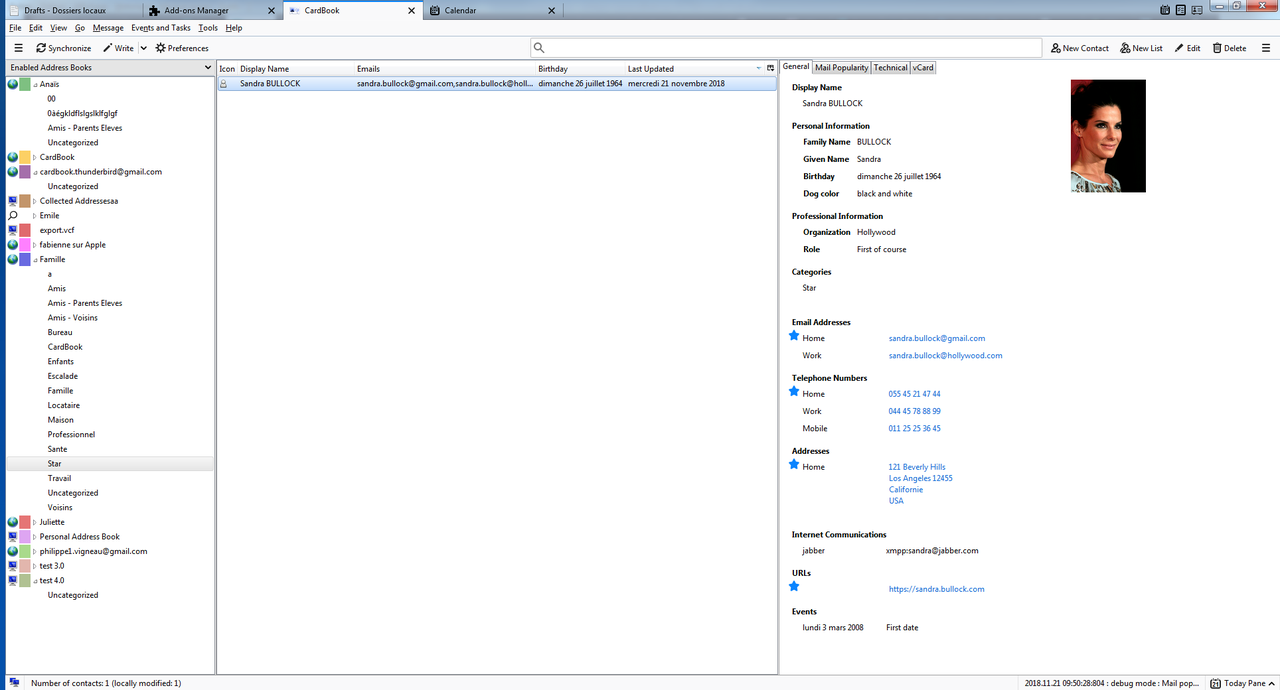
This add-on allows you to manage all your contacts under the vCard standard.
Version History: https://addons.thunderbird.net/en-US/thunderbird/addon/cardbook/versions
Twitter : @CardBookAddon
GitLab: CardBook
Version Information
Version 120.8 3.8 MiB Works with Thunderbird 128.0 - 162.*
- print: a group (Personal Information...) or a field with types can be unchecked, then only some of its fields or types checked again, the group is then shown partly checked, as in the vCard export
- calendar: the calendars are read and the dates of the contacts (birthdays...) written through the calendar API of Thunderbird (draft of webext-experiments), the repeated events computed by ical.js; the windows of a new event or task, and of an event opened, stay the ones of Thunderbird
- Google synchronization (Firefox, Edge and Chrome): an authorization is no longer asked at each synchronization, the refresh token given by Google is kept instead of the access token (valid for an hour), and an offline access is asked for it
- primary password (Firefox, Edge and Chrome): the password typed at the start is checked, a wrong one is refused instead of encrypting the new passwords with it; a forgotten one can be replaced, the saved passwords are then deleted; it can be changed in the preferences (Encryption), the saved passwords are encrypted again with the new one
- main window (Thunderbird): the zoom with Ctrl+ and Ctrl- (or Ctrl and the mouse wheel) is kept from one session to the next, Ctrl+0 goes back to 100%; Thunderbird does not keep the zoom of a tab, CardBook applies its own (#1984)
- contact edition: Ctrl+0 gives back the zoom by default (also with an AZERTY keyboard, or the numeric keypad)
- Microsoft 365 and Google synchronizations: the new refresh token given back at each synchronization (Microsoft ends the former one) is kept, an authorization is no longer asked again when the first one ends
- main window (Thunderbird): with a zoom other than 100%, the window fills the tab again, no more empty space under the list of contacts (or bottom cut off)
- main window (Thunderbird): with a zoom other than 100%, the panes on the sides keep their size on the screen, the splitters follow the mouse
- Google and Microsoft 365 synchronizations: with more modifications than the maximum pushed by synchronization, the photo of the contacts pushed is no longer skipped, which left them modified and sent again first at each synchronization, the others never
- Google synchronization: a contact modified locally and on the server, the local version kept, is now sent (refused by Google before, it stayed to send at each synchronization)
- Microsoft 365 synchronization: no more error when contacts created locally are sent
- main window (Thunderbird): the page takes the focus when its tab is shown (a click on the tab, or the tab restored when Thunderbird starts), Ctrl+ and Ctrl- change the zoom of CardBook, kept, instead of the one of Thunderbird
- contact edition: with an empty social network line, the buttons up, down and remove move or remove the line clicked (another one before)
- CardDAV synchronization: the status of a server error is written in the log (and no more error in Firefox, Edge and Chrome)
- CardDAV synchronization: a contact deleted locally and modified on the server, the deletion kept, is deleted on the server (refused by the server before, the contact stayed there, gone from CardBook)
- Google synchronization: a contact modified locally, without photo, no longer shown twice after its synchronization
- vCard import: the vCards 2.1 written in quoted-printable (old phones, Outlook) are decoded (accents, line breaks), no more import error; the lines folded with a tab, the parameters between quotes with a colon or a semicolon, the last line without END:VCARD and the types written type=work,home are read correctly
- vCard import: a photo with a list of types (TYPE=work,home) or an URL with a comma is read correctly; the parameters encoded as RFC 6868 (^n, ^', ^^) are decoded, and encoded again when the vCard is written
- Google, Microsoft 365, AI keys and local encryption (Thunderbird, ticket #2032): with the new store of the passwords of Thunderbird (signon.storage.rust.active), the refresh tokens and the keys are found again (the window of consent of Google came back at each synchronization, the encryption key was lost); the tokens of Google contacts and Google directory of the same account no longer replace each other; the tokens and keys saved by the former versions are still read
- main window (Thunderbird): Ctrl+, Ctrl- and Ctrl+0 typed while the focus is in the window of Thunderbird (after a click on the tab of CardBook, already shown) zoom CardBook too, instead of the zoom of Thunderbird which was not kept and made the panes on the sides grow
- message filters (Thunderbird): the conditions and the actions of CardBook go through a new API, messageFilters (experiments/messageFilters), proposed to Thunderbird; the filters already made keep working
- quick filter bar (Thunderbird): the button of CardBook goes through a new API, quickFilters (experiments/quickFilters), proposed to Thunderbird; it is now in every mail tab and window, the ones opened later too
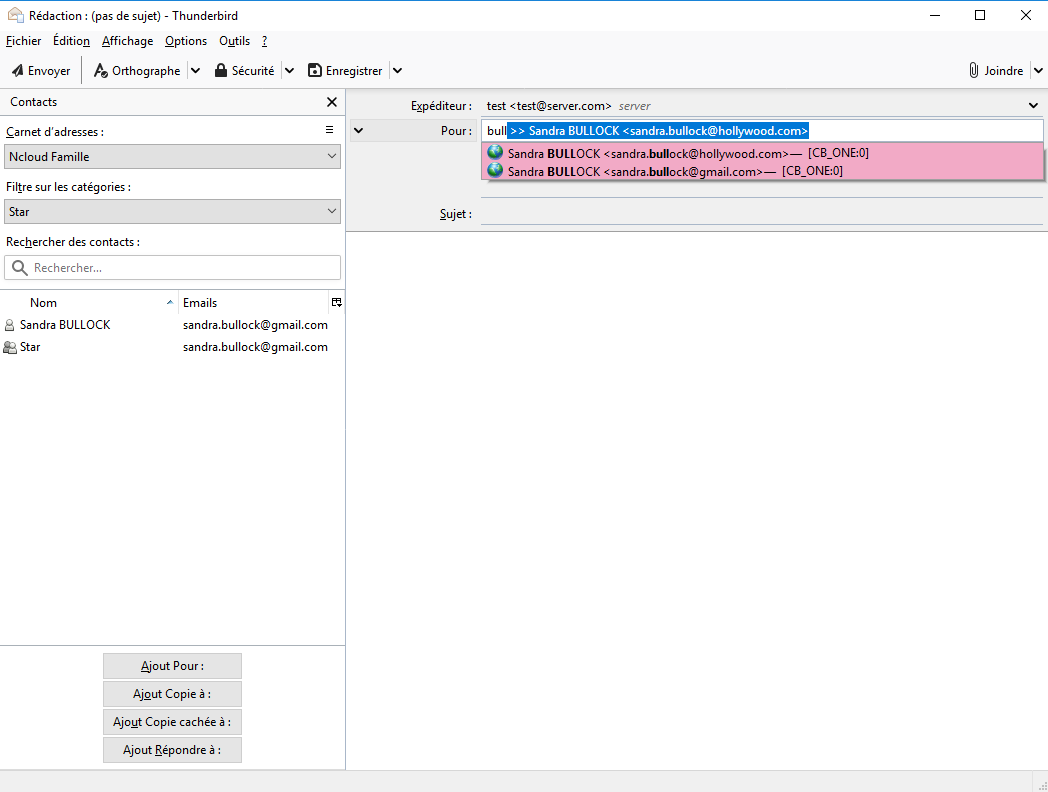
- autocompletion of the addresses (Thunderbird): goes through a new API, addressAutocomplete (experiments/addressAutocomplete), proposed to Thunderbird; the search is made in the background of CardBook, faster; also in the recipient rows added later
- Thunderbird: the density and font size of Thunderbird, the location bar and zoom keys of the tabs of CardBook, its activities and the entry "Add to CardBook" of the Save button of the attachments go through new APIs, uiSettings, contentTabs, activities and attachmentMenus (experiments/), proposed to Thunderbird; the density and font size are followed whatever the window where they are changed; the entry of the Save button is in every displayed message (tabs and windows)
- find the messages of contacts or addresses (Thunderbird): the messages are shown in a tab of CardBook, received and sent, the most recent first, filtered by text, direction, folder, year, starred or unread, found by the message search of Thunderbird (the global search Gloda is no longer needed, nor its indexing)
- addresses of the header of the messages (Thunderbird): the menu of an address and the contacts of CardBook (indicator, name, photo of the sender) go through two new APIs, headerAddressMenus and headerContacts (experiments/), proposed to Thunderbird; the photo is no longer written in the profile, the menu is right for the addresses shown late, and "Find all events of the contact" is shown for a contact; when CardBook is not the only address book, the indicator and the item "Add to Address Book" add to the address books of Thunderbird again
- columns of CardBook in the message list (Thunderbird): they go through a new API, messageListColumns (experiments/messageListColumns), proposed to Thunderbird; only the cells of the messages displayed are computed (not all the messages of the folder), the names are updated when the contacts or the identities change, and the columns are added or removed by the preference without restart
- recipients of the messages being written (Thunderbird): the contacts of CardBook (indicator "Not in address book"), its lists and categories typed as recipients, the format preferred by the contacts and the contacts dragged from the CardBook tab go through a new API, composeRecipients (experiments/composeRecipients), proposed to Thunderbird; the format Automatic chosen by the user is no longer changed, and the categories are found whatever their case
- contacts panel of the compose windows (Thunderbird): an HTML page of CardBook (address books, categories, search, the contacts of CardBook and of Thunderbird, To/Cc/Bcc/Reply-To, menu, drag and drop) in place of the XUL injected in the panel of Thunderbird, by a new API, composeContactsPanel (experiments/composeContactsPanel), proposed to Thunderbird; the search is done in the panel, the first load reads the cards in memory, and the search address books are left out of All address books (their contacts are in the other ones)
- address books and accounts of Thunderbird (Thunderbird): the names of its contacts in the columns of CardBook by the addressBooks API (updated when they change), the kind of its address books (collected, LDAP, CardDAV with its server) and the Google servers of the accounts by two new APIs, addressBookDetails and accountServers (experiments/), proposed to Thunderbird
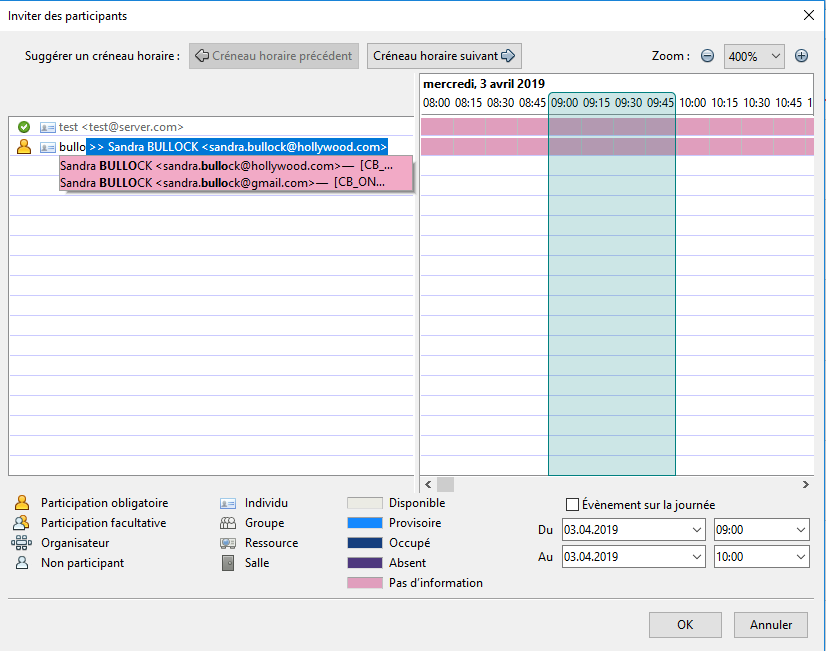
- calendar (Thunderbird): the new events with contacts as attendees, the new tasks and the existing events open the editors of Thunderbird by a new API, calendarEditors (experiments/calendarEditors), proposed to Thunderbird, instead of XUL code copied from Thunderbird
- old local address books File and Directory (Thunderbird): converted into local address books of CardBook when they are loaded, their contacts kept (CardBook does not read the files of the computer by their path anymore; to keep a file, add it again as a File or Directory address book); the ones whose file can not be read are left and converted later; the file of a new File or Directory address book is deleted again when asked at its deletion
- icons (Thunderbird and CB Web): drawn as CSS masks in the color of the text (the selected rows, the themes, the high contrast), without the preference svg.context-properties.content.enabled of Thunderbird, which is not changed anymore; the icons New event, New task and the column picker drawn again in CB Web
- the preferences of the XUL versions of CardBook (before May 2024) are not migrated anymore; the setting of Thunderbird "Show only display name" read by the uiSettings API, the columns of CardBook updated when it changes
- OpenPGP keys of the contacts (Thunderbird): read from the key manager, searched on the keyservers, discovered and imported by a new API, openpgpKeys (experiments/openpgpKeys), proposed to Thunderbird, instead of XUL code loading the modules of Thunderbird; a key already in the key manager is told without the import dialog
- passwords (Thunderbird): the passwords of the servers, the tokens of Google and Microsoft, the keys of the AI and the encryption keys stay in the passwords of Thunderbird, by a new API, logins (experiments/logins), proposed to Thunderbird, instead of XUL code; the primary password is awaited without polling
- menu bar (Thunderbird): Tools > CardBook, New > CardBook Contact and Find > the search address book by a new API, mainMenus (experiments/mainMenus), proposed to Thunderbird, instead of XUL injected in the windows; the shortcut of the address book of Thunderbird (Ctrl+Shift+B) is not removed anymore
- menu bar (Thunderbird): the shortcuts of CardBook shown next to Tools > CardBook and New > CardBook Contact, updated when they are changed
- startup (Thunderbird): CardBook starts as soon as it is loaded, without waiting for a script of the main window (only the conversion of the old local address books waits for it)
- import of an address book of Thunderbird: by the addressBooks API of Thunderbird instead of the old migrateContacts API, the popularity of the addresses by the addressBookDetails API; the members of the lists are imported, and the display name of a contact is preferred when Thunderbird does not tell otherwise
- calendar (Thunderbird): the calendar API of Thunderbird updated (its fixes for Thunderbird 154 and later); the timezone of the calendars read from Thunderbird again, the one of the system when it has none
- sort of the contacts by a date (birthday, anniversary, death date, revision), by age or by gender: right whatever the contacts and the lists (CB Web stopped on a list sorted by a date)
- new contact or list without an address book where to save it (menu New, shortcut, Add to CardBook): the wizard to add an address book opens instead of an edition window that could not save
- drag and drop of contacts to another address book (Thunderbird and CB Web): the contact dragged is the one moved or copied, even when no contact was selected before (nothing happened) or when other contacts were selected (#2035)
- categories of the contacts selected (Thunderbird and CB Web): the menu is there for contacts of several address books (a saved search, a search in all the address books), with the categories of all of them; a category created from this menu is created in their address books and given to them (#2034)
- labels typed for a field of a contact (button +, Thunderbird and CB Web): "Keep for the other contacts" can be unchecked, the label then stays only in this contact and is not added to the list of the labels (#2036)
- categories of the contacts selected (Thunderbird and CB Web): without any category, New category is alone in the menu, without an empty space nor a separator
- menus of the windows of CardBook (Thunderbird): drawn in the windows, as in CB Web (the contacts, the address books, the toolbar, the contact being edited and the text fields), instead of the menus of Thunderbird
- log (Thunderbird): a date of a contact that can not be converted at an import is written to the log
- log window (Thunderbird and CB Web): Refresh rereads the log only, the buttons no longer act several times after a few refreshes
- passwords and keys of the AI (CB Web): "Remember" unchecked keeps them for the session only, as in Thunderbird, instead of saving them
- address books changed from http:// to https:// (encrypted connections only): when their server does not answer, a message tells why and what to do (turn on https on the server, or localhost for a server on this computer), once a session
- discovery of the CardDAV address books (Thunderbird and CB Web): an address book no longer found on its server is proposed for its removal (it never was), once
- lists (Thunderbird): dragged or sent by email from the main window, the contacts they have as members are given (an error stopped it)
- addresses suggested while typing (CB Web): through the licence server, as in Thunderbird; a revoked licence is told, and the preferences window asks the server when it opens
- translations: the primary password in Polish was in Romanian, the tooltip Show/Hide password in Lithuanian ended with stray characters
- CardDAV address books (Thunderbird and CB Web): the vCard versions announced by the server (content-type in lower case, as in the RFC 6352) are read: the wizard offers them, instead of all the versions
- main window (Thunderbird and CB Web): the contacts changed elsewhere (a synchronization, another window, a new address book) are shown at once, and found by the searches; the ones kept for the searches stayed the old ones as long as searches followed each other
- synchronization (CB Web): an import followed by another change (a deletion) no longer leaves the address book synchronizing forever : the synchronization started after the import was reset, and the next one ran with it
- events of a contact (Thunderbird): the button "New event" opens the event dialog again, with the addresses of the contact as attendees
- main window (Thunderbird and CB Web): the list of the contacts stays at the same place when it is shown again (a contact saved, a synchronization), instead of going back to the top (#1946)
- types of the phones (Thunderbird and CB Web): a number of work or home on a mobile (TYPE=WORK,CELL or HOME,CELL) has its own translated type, instead of the raw "WORK" (#2038)
- contact pane (Thunderbird and CB Web): the labels of the types (Geschäftlich, Mobil (geschäftlich)...) no longer break in the middle of a word, their column takes the width of the longest one, the values of the e-mails, phones and addresses still start at the same place (#2039)
- events and tasks of a contact (Thunderbird): the buttons "New event" and "New task" no longer do nothing when the default calendar of Thunderbird is disabled or read-only : a calendar that can receive them is chosen, or a message tells why nothing opens
- notes (Thunderbird and CB Web): the web addresses (https://..., www...., also https// without its colon) and the e-mails written in a note are links, opened in the browser or in a new message
- import (Thunderbird and CB Web): the files of Outlook keep their accents : a file not in UTF-8 is read in Windows-1252, a file in UTF-16 with its BOM is read too, and a note in quoted-printable without charset (Rencontr=E9e) is decoded the same way
- custom fields (Thunderbird and CB Web): X-MS-CARDPICTURE, the picture of the business card of Outlook, can no longer be chosen as a custom field
- contact pane (Thunderbird and CB Web): the labels of the types are measured as they are drawn, so they stay on one line with a minimum size of the fonts (font.minimum-size), a zoom or a font replaced ; the canvas measured them with the font asked for (#2039)
- Source code released under Mozilla Public License, version 2.0
