 Add-ons
Wolkom by Thunderbird Add-ons.
Foegje ekstra funksjes en stilen ta om Thunderbird hielendal fan jo te meitsjen.
Slute
SmartTemplates 4.21
troch Realraven (Axel Grude), Marky Mark DE
SmartTemplates offers an easy and powerful way to automatically create customized replies by auto-inserting various mail headers. Templates can be created for every mail identity, Stationery files can now be imported and used directly.





Oer dizze add-on
You put email to work. Save time every day.
SmartTemplates helps you write consistent, personalized emails in Thunderbird using reusable templates and Smart Fragments. Automatically insert names, dates and message details, choose a template for the task, and reuse content without repeatedly copying and editing it.
Start with a greeting and signature, or build a complete HTML layout for business correspondence, customer replies and other messages you write regularly.
Templates for the way you work
Reuse content with Smart Fragments
Insert reusable sections while composing: standard answers, instructions, introductions, formatting and more. Smart Fragments can contain template variables, and Pro features let you wrap or transform selected text.
Go further with automation
Advanced features can change message headers, match and replace text, customize quoted content, work with the clipboard, and include external content and style sheets. Pro also supports CardBook contact data and automatic replies or forwarding through FiltaQuilla integration. Feature availability depends on your license; see the feature comparison for details.
Choose your edition
Paid licenses are annual. Your support funds ongoing development, Thunderbird compatibility work and help for users. Find current pricing and edition details on the licensing page.
Examples and help
Explore example templates and the variable reference, or visit the support site for guides.
For help, use the Support tab in SmartTemplates settings or report an issue. Include your Thunderbird and SmartTemplates versions, operating system, and a short example of the problem. The troubleshooting guide explains how to collect diagnostic information. Please remove private information from examples and screenshots.
Source and acknowledgments
The source code is available on GitHub under Creative Commons Attribution-NoDerivatives 4.0 International (CC BY-ND 4.0).
SmartTemplates grew from the original SmartTemplate by H. Yasuda (gaby_hy), with the author's permission. Thanks to carlitus for the Noia icon artwork.
SmartTemplates helps you write consistent, personalized emails in Thunderbird using reusable templates and Smart Fragments. Automatically insert names, dates and message details, choose a template for the task, and reuse content without repeatedly copying and editing it.
Start with a greeting and signature, or build a complete HTML layout for business correspondence, customer replies and other messages you write regularly.
Templates for the way you work
- Set different templates for new messages, replies and forwards, with individual settings for each account or shared settings across accounts.
- Give different identities within the same mail account their own templates, so each sender address can have its own greeting, layout and signature.
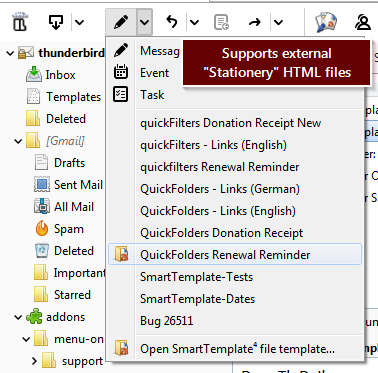
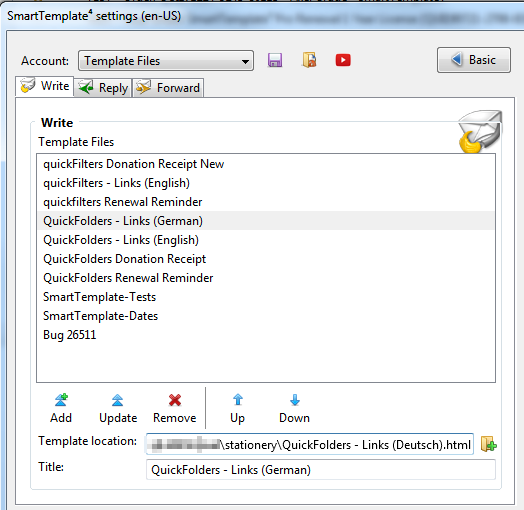
- Choose external HTML templates from menus, organize them into categories, and quickly reuse recent templates.
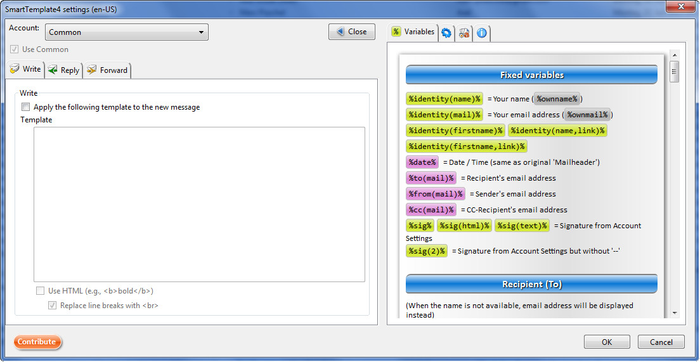
- Personalize messages with variables for names, addresses, subjects, dates and other message details.
- Include your Thunderbird signature and control where your own text and the quoted conversation appear.
- Design a custom quote header: the block above the quoted email in a reply or forward. Replace the default header with your own layout and details such as the original sender, recipients, date and subject.
- Use HTML or plain-text templates. Layout and styling features require HTML.
Reuse content with Smart Fragments
Insert reusable sections while composing: standard answers, instructions, introductions, formatting and more. Smart Fragments can contain template variables, and Pro features let you wrap or transform selected text.
- Browse the online Smart Fragments library and download fragments directly into your collection.
- Add fragments to the composer context menu for quick access while writing.
- Use fragments as formatting macros: highlight selected text, add a drop shadow, or apply reusable HTML styling without editing the source each time.
Go further with automation
Advanced features can change message headers, match and replace text, customize quoted content, work with the clipboard, and include external content and style sheets. Pro also supports CardBook contact data and automatic replies or forwarding through FiltaQuilla integration. Feature availability depends on your license; see the feature comparison for details.
Choose your edition
- Free edition: get started with basic templates and standard variables, with limits on template menus and access to licensed features.
- Standard: more room for everyday templates, plus features such as custom date formatting and external content and style sheets.
- Pro: all premium features for your own email, with no license-tier limit on template entries or categories.
- Domain: Pro features for your team, licensed by seats and a shared email domain.
Paid licenses are annual. Your support funds ongoing development, Thunderbird compatibility work and help for users. Find current pricing and edition details on the licensing page.
Examples and help
Explore example templates and the variable reference, or visit the support site for guides.
For help, use the Support tab in SmartTemplates settings or report an issue. Include your Thunderbird and SmartTemplates versions, operating system, and a short example of the problem. The troubleshooting guide explains how to collect diagnostic information. Please remove private information from examples and screenshots.
Source and acknowledgments
The source code is available on GitHub under Creative Commons Attribution-NoDerivatives 4.0 International (CC BY-ND 4.0).
SmartTemplates grew from the original SmartTemplate by H. Yasuda (gaby_hy), with the author's permission. Thanks to carlitus for the Noia icon artwork.
