 ਐਡ-ਆਨ
ਐਡ-ਆਨ
ਸੁਨੇਹੇ ਦੀ ਬਣਤਰ
-
*cloud - FileLink for Nextcloud and ownCloud
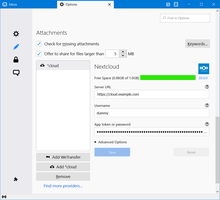
Upload large attachments to your Cloud and send the link by email
39,009 ਉਪਭੋਗੀ -
SmartTemplates
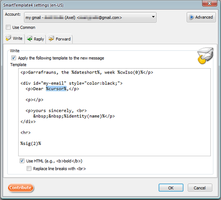
SmartTemplates offers an easy and powerful way to automatically create customized replies by auto-inserting various mail headers. Templates can be created for every mail identity, Stationery files can now be imported and used directly.
3,807 ਉਪਭੋਗੀ
ਸੱਭ ਤੋਂ ਮਸ਼ਹੂਰ ਵੇਖੋ ਸੱਭ »
-
 True "Send Later" functionality to schedule the time for sending an email.1,16,565 ਉਪਭੋਗੀ
 -
 Check your emails for spelling and grammar issues77,254 ਉਪਭੋਗੀ
 -
 Create and Save or Send Multiple Individual and Personalized Messages from a Draft74,568 ਉਪਭੋਗੀ
 -
 Switch the signature on/off or choose a new one from your predefined set.54,785 ਉਪਭੋਗੀ
 -
 Highlights selected text when composing emails. Default colour is yellow - other colours are available via Options.
(Works only during writing an e-mail, i.e. only in the compose window.)53,800 ਉਪਭੋਗੀ -
 Securely encrypt and upload large attachments to any Send service instance (formerly Firefox Send).52,804 ਉਪਭੋਗੀ
ਚੋਟੀ ਦਾ ਦਰਜਾ ਪ੍ਰਾਪਤ ਵੇਖੋ ਸੱਭ »
-
 Quickly choose one of the previously selected colors for a message text1,352 ਉਪਭੋਗੀ
 -
 Thunderbird は Outlook のようにアドレス全選択からの「一括コピー」ができません。
それを実現するためのアドオンです。314 ਉਪਭੋਗੀ -
Macro Template is to replace mail templates with macros for date formatting.523 ਉਪਭੋਗੀ
-
Default "Reply" functionality pays attention to "Reply-To" in original email57 ਉਪਭੋਗੀ
-
 Allows you to use your Exchange and Office365 email account with Thunderbird using Outlook Web Access (OWA).43,856 ਉਪਭੋਗੀ
 -
Create and Save or Send Multiple Individual and Personalized Messages from a Draft74,568 ਉਪਭੋਗੀ
ਹਾਲ ਹੀ ਵਿੱਚ ਸ਼ਾਮਲ ਕੀਤਾ ਵੇਖੋ ਸੱਭ »
-
 Drag and drop files from your file manager directly into the compose window to add them as attachments.
从文件管理器或桌面直接将文件拖拽到写邮件窗口中,即可将其添加为附件,无需再点击附件按钮逐级查找文件。0 ਉਪਭੋਗੀ -
A Thunderbird MailExtension that adds an `R-b` button to the compose window and inserts a `Reviewed-by:` line for the currently selected sender identity at the current cursor position.2 ਉਪਭੋਗੀ
-
 Delays sending an email and provides a notification to undo it.3 ਉਪਭੋਗੀ
 -
 Encrypt and upload large files with to Retyc. Recipients with a Retyc account get E2E encryption; others access files using a passphrase.2 ਉਪਭੋਗੀ
 -
 A simple extension to upload attachment files to your KekUpload (https://github.com/GamePowerX/KekUploadServer) instance.3 ਉਪਭੋਗੀ
 -
Certify your emails on the blockchain directly from Thunderbird. Legal-grade, eIDAS-qualified proof — without changing your workflow. Add the certification BCC address to your compose window in one click.2 ਉਪਭੋਗੀ
ਸੁਨੇਹੇ ਦੀ ਬਣਤਰ » ਵਿੱਚ 310 ਸਾਰੇ ਵਾਧਰੇ ਵੇਖੋ
ਆਪਣੇ ਖੁਦ ਦੇ ਸੰਗ੍ਰਹਿ ਬਣਾਉਣ ਲਈ, ਤੁਹਾਡੇ ਕੋਲ ਇੱਕ ਮੌਜੀਲਾ ਐਡ-ਆਨ ਖਾਤਾ ਹੋਣਾ ਚਾਹੀਦਾ।
