 Дополнения
Добро пожаловать в дополнения Thunderbird.
Добавляйте дополнительные функции и стили, чтобы настроить Thunderbird по своему вкусу.
ЗакрытьСоставление сообщений
-
SmartTemplate4
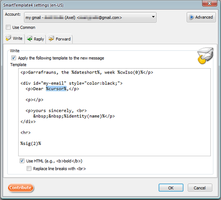
SmartTemplate4 настраивает заголовок цитат для каждой учётной записи. SmartTemplate4 позволяет настраивать заголовки цитат используя шаблоны. Шаблоны могут быть созданы как для всех, так и для каждой учетной записи.
3 799 пользователей -
*cloud - FileLink for Nextcloud OpenCloud ownCloud
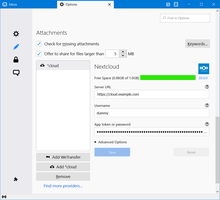
Upload large attachments to your Cloud and send the link by email
39 082 пользователя
Самые популярные Посмотреть все »
-
 “Send Later” - планировщик времени отправки сообщений электронной почты.124 120 пользователей
 -
 Create and Save or Send Multiple Individual and Personalized Messages from a Draft82 144 пользователя
 -
 Проверяйте ваши тексты на наличие орфографических или грамматических ошибок где угодно в Интернете80 652 пользователя
 -
 Highlights selected text when composing emails. Default colour is yellow - other colours are available via Options.
(Works only during writing an e-mail, i.e. only in the compose window.)55 273 пользователя -
 Switch the signature on/off or choose a new one from your predefined set.55 249 пользователей
 -
 Securely encrypt and upload large attachments to any Send service instance (formerly Firefox Send).52 717 пользователей
Лидеры рейтинга Посмотреть все »
-
 Thunderbird は Outlook のようにアドレス全選択からの「一括コピー」ができません。
それを実現するためのアドオンです。391 пользователь -
Macro Template is to replace mail templates with macros for date formatting.596 пользователей
-
Default "Reply" functionality pays attention to "Reply-To" in original email54 пользователя
-
Create and Save or Send Multiple Individual and Personalized Messages from a Draft82 144 пользователя
-
 Warns if you send mail from or to a specified domain. If there are multiple accounts in your profile, you can isolate one so that you can't send mail to that domain from outside or vis versa without warning.89 пользователей
Недавно добавленные Посмотреть все »
-
 Smart semantic voice dictation inspired by Google Rambler: removes filler words, auto-corrects on the fly, and formats clean emails right under your cursor in Thunderbird.2 пользователя
 -
Preserves Microsoft Excel table formatting when copying and pasting tables into Thunderbird email messages.6 пользователей
-
 Canned replies for Thunderbird: type a key like po1 and press Tab, or search your snippets. Fields like {{PONUMBER}}, recipient names, dates, attachments and Quicktext import.3 пользователя
 -
Uploads large attachments to Infomaniak kDrive and inserts a share link into the message.
Télécharge vos pièces jointe dans un dossier Kdrive et insert un lien unique dans le message.2 пользователя -
 Écartez un mail en cours, puis envoyez-le d’un clic ou rouvrez-le pour le modifier. Plus simple qu’un brouillon classique. Le tout via un dossier local : Messages en attente0 пользователей
 -
 Connect Thunderbird to local Codex chats: search mail, manage attachments and prepare replies with history. Drafts by default; optional autonomous sending.1 пользователь
Показать все 388 расширений в Составление сообщений »
Для создания своих подборок вам необходимо иметь учётную запись на сайте дополнений Mozilla.
